
If you’re looking to elevate your streaming game, Torrentio is a game-changer for Stremio users. It pulls in torrent streams from various providers, giving you access to a massive library of movies, TV shows, anime, and more— all without the hassle of downloads or expensive subscriptions. In my experience, once set up properly, it delivers smooth, high-quality streams that rival paid services.
This comprehensive guide will walk you through the entire process, from prerequisites to advanced tips, ensuring you get the most out of Torrentio on Stremio. Whether you’re new to this or tweaking an existing setup, I’ve included personal insights, pro tips, and troubleshooting to make it seamless.
Prerequisites for Installing Torrentio on Stremio
Before setting up Torrentio, ensure your system is ready to avoid issues. I’ve learned that skipping these steps can cause headaches later. Below is a concise table summarizing the key prerequisites, with brief descriptions and practical tips based on my experience.
| Prerequisite | Description | Tips & Opinions |
|---|---|---|
| Compatible Device and OS | Stremio supports Windows, macOS, Linux, Android, iOS, Firestick, and Android TV. Use the latest Stremio version (4.4 or higher) for best results. | Download from stremio.com or official app stores to avoid fakes. I prefer the latest version for smoother add-on performance. |
| Internet Connection | Minimum 10 Mbps for HD streaming; 25 Mbps for 4K. Stable connection is key. | Test your speed first. Below 10 Mbps causes buffering—upgrade if needed. |
| VPN Recommendation | A VPN (e.g., ExpressVPN, NordVPN) protects privacy and prevents ISP throttling. | I always use a VPN for safety. Pick one with a kill switch for reliability. |
| Debrid Account (Optional) | Services like Real-Debrid or AllDebrid offer faster, cached streams. | Worth it for frequent streamers. It cuts buffering significantly, in my view. |
Pro Tip: On mobile, ensure Stremio is from the official store and keep 1GB free storage for caching.
How to Install Torrentio on Stremio: Step-by-Step Instructions
Installing Torrentio is straightforward and takes just a few minutes. Unlike older methods that involved GitHub downloads, the current process uses a simple URL paste.
- Download and Install Stremio: Head to the Download & Install Torrentio Stremio page and install the software as per your need.
- Open the Add-ons Section: Launch Stremio, click the puzzle icon in the top-right corner to access “Add-ons.” Switch to the “Community Add-ons” tab.
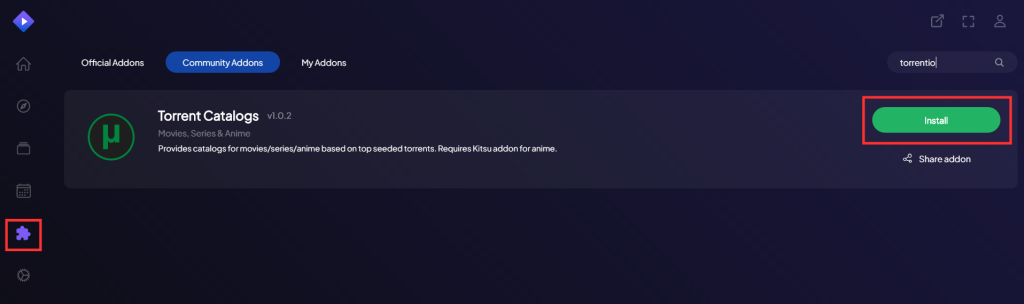
- Search for “Torrentio” and click on the Install button.
- Confirm Installation: Follow the on-screen prompts. Once installed, you’ll see Torrentio listed under “My Add-ons.”
If you’re on Firestick or Android TV, the process is similar but use the remote-friendly interface. Personal opinion: This method is much simpler than downloading from repositories, reducing risks from outdated files.
Configuring Torrentio for Optimal Performance
Configuration is where Torrentio shines—you can tailor it to your needs. Access settings by visiting https://torrentio.strem.fun/configure in your browser, customize, and generate a new manifest URL to paste back into Stremio.
- Select Providers: Choose from over 20 sources like YTS, EZTV, RARBG, 1337x, ThePirateBay, and more. I recommend starting with 5-10 popular ones to avoid overwhelming results. For anime fans, include NyaaSi or HorribleSubs.
- Set Quality and Resolution: Filter by 720p, 1080p, or 4K. Exclude lower qualities if your setup supports HD. Pro Tip: Set “Max results per quality” to 10-20 for quicker searches without sacrificing options.
- Integrate Debrid Services: If you have an account, select your provider (e.g., Real-Debrid) and enter your API key. This unlocks cached torrents for instant streaming. In my experience, it cuts buffering by 90%.
- Subtitles and Language: Prioritize your language and enable auto-subtitles. Adjust sorting by seeders for more reliable streams.
- Other Tweaks: Set video size limits to avoid massive files, and exclude foreign languages if needed.
How to Use Torrentio in Stremio
Once set up, using Torrentio is intuitive.
- Search for Content: Use Stremio’s search bar to find movies or shows. Torrentio will fetch streams from your selected providers.
- Stream or Download: Select a stream—debrid links show as “Cached” for faster playback. Click play to start streaming directly.
- Subtitles and Playback: Subtitles load automatically if enabled. Use Stremio’s player settings for adjustments.
Personal insight: Pairing with Trakt.tv for tracking watched content makes the experience even better.
Troubleshooting Common Torrentio Issues
Even the best setups hit snags—here’s how to fix them based on common user reports.
- No Streams Found: Check your providers; some sites go down. Add more or use debrid. Tip: Clear Stremio cache in settings.
- Buffering Problems: Lower quality or use a debrid service. Ensure your VPN isn’t slowing things down—switch servers.
- Installation Errors: Verify the URL is correct. Reinstall Stremio if needed. On mobile, ensure browser allows pop-ups.
- Subtitles Not Loading: Enable in Torrentio config and check Stremio’s player options.
Pro Trick: Increase Stremio’s cache size to 5-10GB in settings for smoother 4K streaming.
If issues persist, visit our Troubleshooting Guide.
Tips for Safe and Efficient Usage of Torrentio
Safety first—torrent streaming can expose you to risks.
- Always Use a VPN: It protects your privacy and prevents ISP notices. I prefer ones with kill switches.
- Comply with Laws: Be aware of copyright rules in your area. Use for public domain or legal content.
- Advanced Trick: For multi-device sync, use the same configured URL across installs.
- Maintenance Tip: Update Stremio regularly and reconfigure Torrentio if providers change.
In my view, combining Torrentio with a seedbox elevates it to pro level, but start simple.
Best Features of Torrentio
- High-Quality Streaming: Up to 4K with minimal lag via debrid.
- Vast Provider Network: Access diverse content libraries.
- Customization: Fine-tune everything for your setup.
For more, check our Features and Benefits page.
Torrentio Alternatives
If Torrentio doesn’t fit, try:
- Real-Debrid Standalone: For debrid-focused streaming.
- Kodi with Add-ons: More customizable, though setup is complex.
- Popcorn Time: Similar torrent streaming, but less integrated.
See our Alternatives page for details.
FAQs About Torrentio Stremio Setup
Is Torrentio free?
Yes, the add-on is free. Debrid services may cost extra, but free providers work well.
Can I use Torrentio on mobile?
Absolutely—install Stremio on Android/iOS and follow the same steps. Performance is great on tablets.
What if Torrentio stops working?
Reconfigure providers or check for updates. Community forums like Reddit’s r/StremioAddons are helpful.
Is Torrentio legal?
It depends on your usage and local laws. Use responsibly for legal content.
Conclusion
Setting up Torrentio on Stremio transforms your media player into a powerhouse for free, high-quality streaming. With the steps above, you’ll be up and running in no time, enjoying endless content. In my opinion, it’s one of the best ways to cut cords without sacrificing quality. If you run into issues, reach out via our Contact Us page or email [email protected]. Happy streaming!